
Prove your qualifying spend before you apply.
Rebate applications are built on qualifying spend. Qualifying spend is calculated from exclusions. And exclusions are applied line by line, across every budget category — a process most producers do by hand, in a spreadsheet, disconnected from the budget itself.
loqyn's Qualifying Rebates tool links directly to your production budget. National expenditure exclusions and foreign/co-production exclusions are applied systematically to each line item. The qualifying spend calculation updates as your budget changes. No competitor offers this.
Start free on Spark. Qualifying Rebates available from Screen Ember.
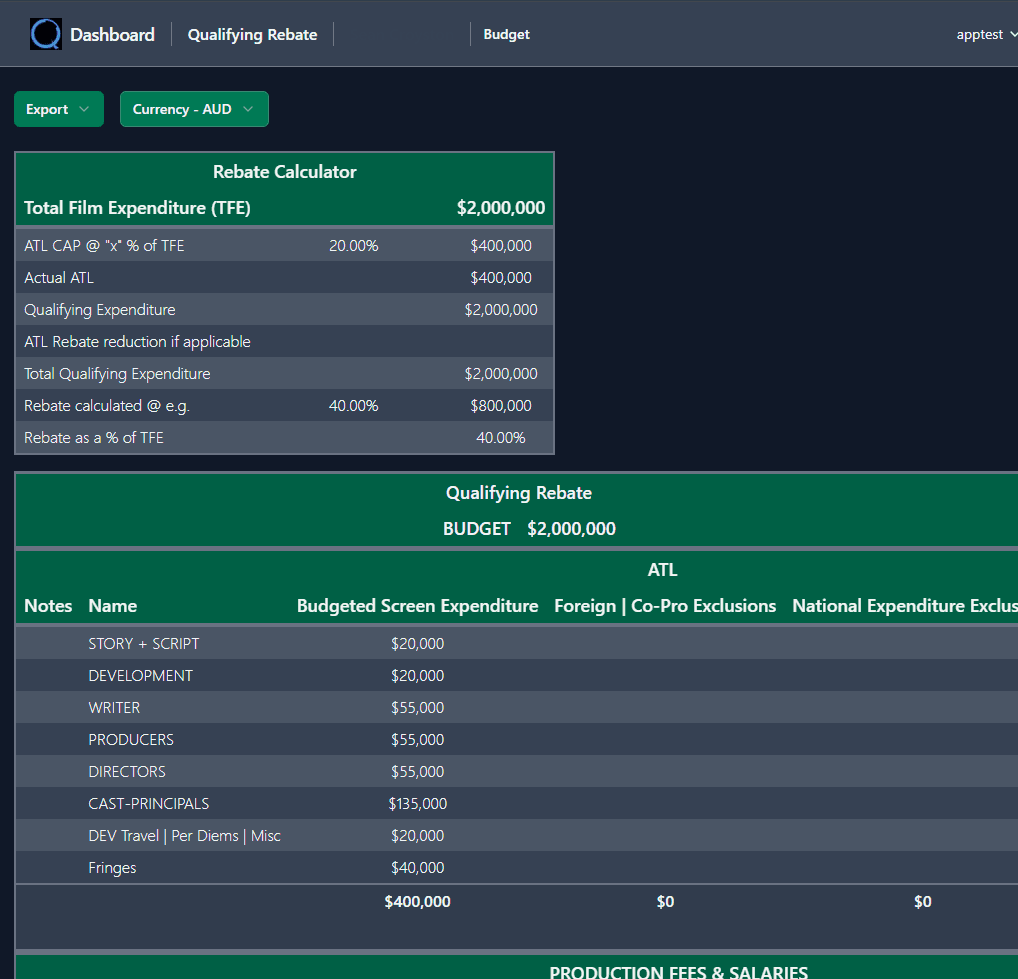
Qualifying Rebates links to your budget. Change a line item — the qualifying spend recalculates.
"I've applied for the rebate. Now the agency wants to see exactly which budget lines qualify — and I've been calculating exclusions in a spreadsheet that hasn't been updated since the budget changed."
Rebate eligibility isn't a simple percentage of total spend. It's a line-by-line calculation: which costs qualify, which are excluded as national expenditure, which fall under foreign or co-production rules. Every jurisdiction has different criteria. And every budget change invalidates the last calculation.
Most producers estimate their qualifying spend early, apply on that basis, and then discover discrepancies when the actual numbers are audited. The gap between estimated and actual qualifying spend is where rebate claims get reduced — or rejected.
- Qualifying spend is calculated in a spreadsheet disconnected from the production budget — every budget change makes it stale
- Exclusions are applied manually across hundreds of line items — one error can reduce the entire claim
- No budgeting tool — legacy or modern — includes a rebate eligibility calculator linked to actual budget data
- Producers estimate rebate income for their Finance Plan without knowing whether the qualifying spend supports it
- Above-the-line caps and jurisdiction-specific rules are tracked informally — often discovered too late
From budget to qualifying spend — systematically
No more manual exclusion spreadsheets. Qualifying Rebates reads your budget and lets you allocate exclusions per line item.
Structure your finance with incentive awareness built in.
Screen Ember is for the stage where the budget exists but the finance structure is still taking shape. Qualifying Rebates, Recoupment Forecasting, and Location Value give you the structuring tools that inform how the deal comes together.
Know your qualifying spend before you apply. Model the rebate income in your Finance Plan with confidence — because the numbers are linked, not guessed.
Know your qualifying spend before you apply.
Start free on Screen Spark. Build your budget. Upgrade to Ember when you need rebate modelling, recoupment forecasting, and the structuring tools that turn a budget into a deal.
No installs. No spreadsheets. Cancel anytime.
Get early access, updates, and release announcements
Occasional emails. Unsubscribe anytime