
Budget to what you can raise — not what you'd like to spend.
Every independent production starts with the same question: how much can we actually raise? Not how much would we like to spend. Not how much does the script suggest. How much money is realistically available — and what does a credible budget look like at that number?
loqyn's Auto-Budget Pro starts from your target spend and generates a balanced, line-item budget calibrated to industry-proven cost ratios. Not AI guesswork. Not a blank template. A proportionally sound budget you can put in front of an investor on day one.
No installs. No spreadsheets. Cancel anytime.
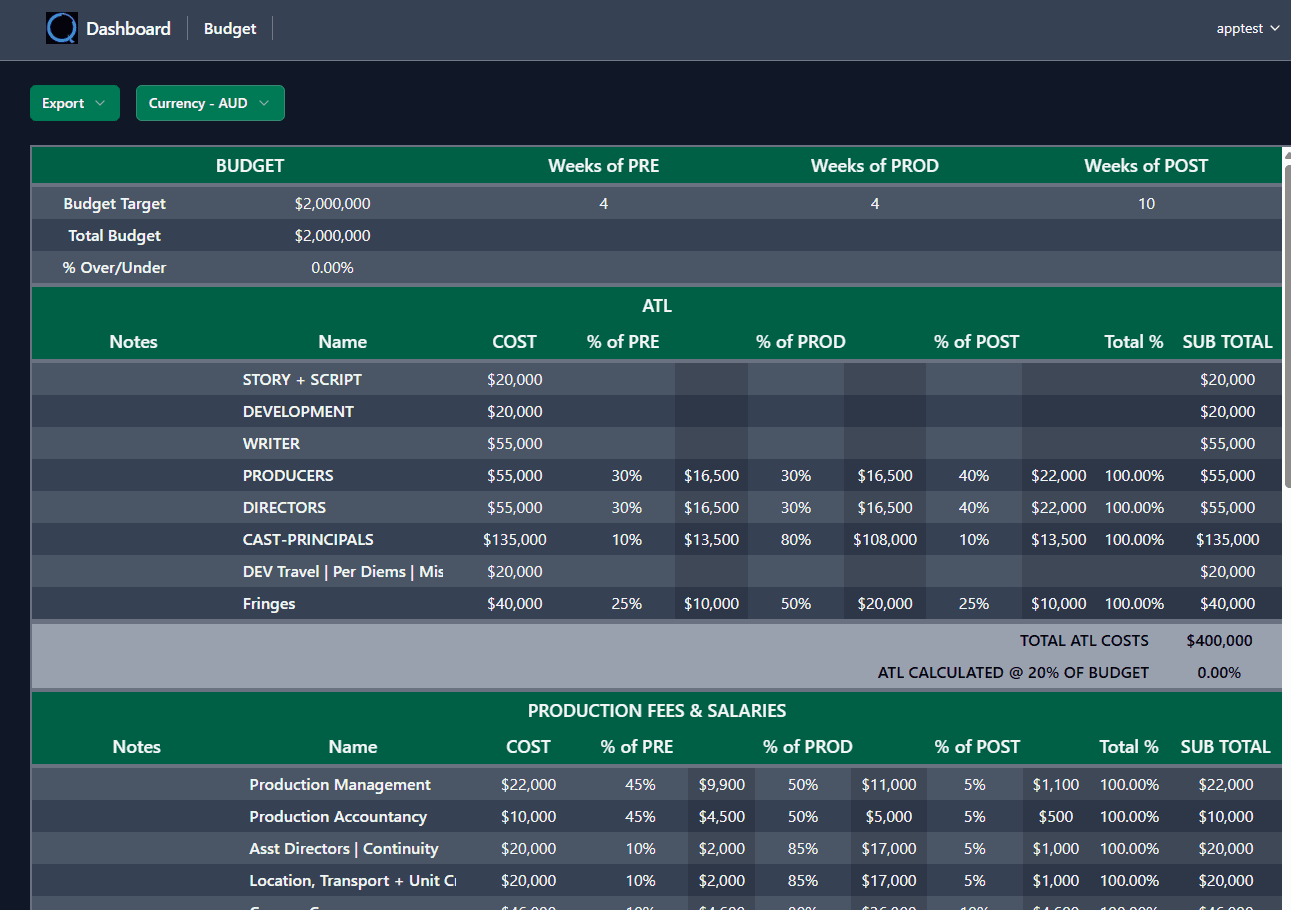
The budget is where every connected output begins. One update flows everywhere.
"I know I can raise $800K. I just need someone to tell me what a credible $800K budget looks like — without spending three weeks building one from scratch."
Traditional budgeting starts at zero and builds up, line by line, until you arrive at a total that may or may not match reality. If the number is wrong, you start again. If you're an emerging filmmaker, you may not even know what a credible cost ratio looks like for your genre and scale.
Auto-Budget Pro inverts the process. Start with what you can raise. Let loqyn distribute that figure across industry-calibrated line items. Then review, tweak, and lock — a process that takes minutes, not weeks.
- Building a budget from a blank template takes weeks — and the total rarely matches what you can actually raise
- Emerging filmmakers don't know what credible cost ratios look like for their genre and budget level
- Legacy desktop tools start at $42.99/month — just for the budget, with no finance stack underneath
- AI-generated budgets estimate costs from script analysis — investors don't trust estimates, they trust ratios
- Every other tool stops at the budget. The Finance Plan, Cashflow, and Recoupment are your problem
From target spend to investor-ready — in minutes
Auto-Budget Pro doesn't ask you to fill in 200 empty cells. It asks you one question: what's your target spend?
Why loqyn starts with the number, not the line items
Traditional budgeting works bottom-up: list every cost, total them, and hope the number matches your financing. It rarely does. You end up either cutting to fit a number you already knew, or presenting a budget that's disconnected from the money you can actually raise.
Target-spend budgeting inverts this. You start with the financial reality — the number your market, your investors, and your financing structure can support — and build a credible budget within it. The line items are calibrated, not guessed. The ratios are industry-proven, not AI-estimated. And the total matches the money before anyone sees the document.
This isn't a shortcut. It's how experienced producers actually think about budgets. loqyn just makes the process systematic.
Industry-proven ratios. Not AI estimates.
Competitors use AI to estimate costs from script analysis — parsing scene descriptions for locations, cast size, and VFX complexity. The result is an estimate. Educated, perhaps. But still a guess.
loqyn's Auto-Budget Pro uses industry cost ratios — the proportional relationships between budget categories that have been validated across thousands of productions at every scale. These ratios tell you what a credible budget looks like at $200K, $1M, or $5M — because the proportional structure of film budgets follows well-established patterns.
The difference matters when you're sitting across from an investor. Ratios are defensible. Estimates are not.
The budget before loqyn — and after
Every tool in the loqyn stack builds from Auto-Budget Pro.
Auto-Budget Pro is free on Screen Spark — because the budget is the foundation, not the destination. The real power of loqyn is what happens next: your budget flows into a Finance Plan, then Cashflow, then Drawdown, then Recoupment, then Waterfall. Every connected tool builds from the same set of numbers.
Upgrade when your production needs the next piece. The budget data carries forward — no re-keying, no export/import, no version drift.
Build a fundable budget in minutes. Free.
Start with Auto-Budget Pro on Screen Spark — free, no credit card, no installs. When your production needs Finance Plan, Recoupment, and the full investor stack, upgrade to the tier that fits.
No installs. No spreadsheets. Cancel anytime.
Get early access, updates, and release announcements
Occasional emails. Unsubscribe anytime